 By Owen Palmer
Updated November 2026
Shoppers looking for a prime day fire tablet usually want one thing: a dependable tablet for reading, streaming, video calls and light work, without overspending on a device that will sit in a drawer in six months. This guide compares four current Amazon tablets against the criteria that matter most for that decision: screen size and portability, memory and storage, battery life, ecosystem fit (Alexa, Google Play or Fire OS), and how well each model suits a specific household need. Nothing here is a lab test. It is a research-based comparison built from published specifications, brand track record and patterns that owners commonly report.
Our top picks at a glance
- 1
 TOP CHOICEBest overallAmazon Alexa Tablet 8 (all-new)View on Amazon
- 2
 Best for productivity1" Android 16 Tablet with KeyboardView on Amazon
- 3
 Best budget pickLike-New Amazon Fire HD 10 TabletView on Amazon
- 4
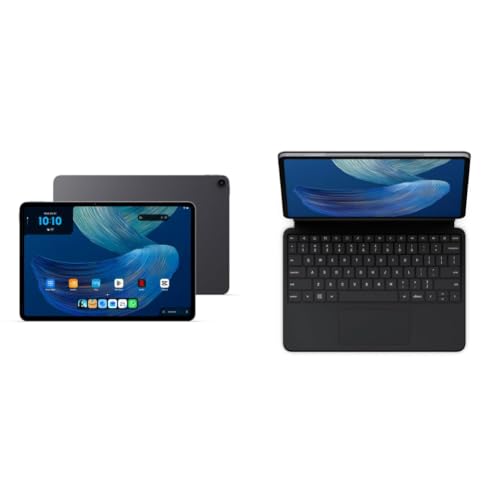 Best for a large screen and keyboardAlexa Tablet 12 Pro Keyboard BundleView on Amazon
Our Top Picks
Each pick below is matched to a different type of buyer. The table gives the quick view; the sections that follow explain the trade-offs.
Quick Comparison
| Product | Best for | Key feature |
|---|---|---|
| Amazon Alexa Tablet 8 | Everyday use and portability | Compact 8.7″ display with Alexa+ and Google Play support |
| 10.1″ Android 16 Tablet with Keyboard | Work, study and multitasking | Included keyboard and large memory configuration |
| Like-New Amazon Fire HD 10 Tablet | Budget-minded households | 10-inch screen with a standing cover included |
| Alexa Tablet 12 Pro Keyboard Bundle | Large-screen viewing and laptop-style use | 12-inch 2.8K display with 128GB storage |
Amazon Alexa Tablet 8 (all-new)
Amazon Alexa Tablet 8 (all-new), 4GB RAM, 64GB, 8.7″ compact tablet with vivid display, All-day battery, With Google Play, Designed for Alexa+, Graphite
Best for: Everyday use and portability
This is the pick for someone who wants a tablet they can carry in one hand. The 8.7-inch size suits reading in bed, recipe lookups in the kitchen and video in a bag or on a commute. It is also a reasonable choice for a first tablet for a teenager or an older relative who wants a simple device.
Key specs
- 8.7-inch display
- 4GB RAM
- 64GB storage
- Designed for Alexa+
- With Google Play
Pros
- Compact enough for one-handed reading and easy to slip into a bag
- Google Play support gives access to a wider app library than some Fire-only tablets
- Alexa integration works well for timers, reminders and hands-free questions
Cons
- Smaller screen is less comfortable for long document editing or side-by-side windows
- 64GB fills up quickly if you store many offline videos or large games
Bottom line: Choose this if portability matters more than screen real estate, and you plan to use the tablet mostly for reading, streaming and quick tasks.
View on Amazon10.1″ Android 16 Tablet with Keyboard
10.1" Android 16 Tablet with Keyboard, 30GB RAM 64GB ROM, Gray | Widevine L1, Dual Band WiFi, 6000mAh Battery, Eye Care Display, Octa-Core, 1TB Expandable, 2-in-1 Tablet for Work, Study
Best for: Work, study and multitasking
This model is aimed at people who treat a tablet as a light computer. The 10.1-inch screen gives more room for documents and browser tabs, and the included keyboard makes typing practical for emails, essays and spreadsheets. It also suits students who want notes, reading and research on one device.
Key specs
- 10.1-inch display
- Android 16 operating system
- 64GB ROM storage
- Keyboard included
- Dual-band Wi-Fi
Pros
- Included keyboard turns the tablet into a workable writing device
- Larger screen supports split-window multitasking and document work
- Dual-band Wi-Fi helps with video calls and streaming on crowded networks
Cons
- Keyboard adds weight and bulk, reducing its appeal for pure reading
- Third-party brands sold in this category can vary in software update support, so check the update policy before buying
Bottom line: A strong fit for students and remote workers who want a keyboard-equipped tablet without buying a full laptop.
View on AmazonLike-New Amazon Fire HD 10 Tablet
Like-New Amazon Fire HD 10 Tablet (32GB Black) + Standing Cover (Black)
Best for: Budget-minded households
This is the value option. The Fire HD 10 line has long been positioned as a mid-size, Fire OS tablet suited to streaming, reading and family use. A like-new unit with a standing cover is a sensible choice if you want the Amazon ecosystem and a stand for watching video, without paying for the newest hardware.
Key specs
- 10-inch display
- 32GB storage
- Black finish
- Standing cover included
Pros
- Standing cover makes it easy to prop up for video and recipes
- Good size for shared family use and streaming
- Fire OS is simple to set up, with strong integration into Amazon media services
Cons
- 32GB storage is limited; a microSD slot or cloud storage will likely be needed
- “Like-new” condition means the unit is not sealed; check the seller’s return policy and warranty coverage before purchase
Bottom line: The right choice for families or first-time tablet buyers who mainly stream and read and want the lowest-risk way into the category.
View on AmazonAlexa Tablet 12 Pro Keyboard Bundle
Alexa Tablet 12 Pro Keyboard Bundle, 128GB, 12″ stunning 2.8K display
Best for: Large-screen viewing and laptop-style use
If the 8-inch and 10-inch models feel cramped, this is the step up. The 12-inch display with 2.8K resolution is noticeably larger and sharper for film, photo editing and spreadsheets. The keyboard bundle makes it work as a laptop replacement for many light tasks.
Key specs
- 12-inch display
- 2.8K resolution
- 128GB storage
- Keyboard bundle included
Pros
- Large, high-resolution screen suits film, photos and multi-window work
- 128GB storage offers more room for apps, downloads and files than 32GB or 64GB models
- Keyboard bundle makes it practical for writing and browsing
Cons
- Heavier and less portable than smaller tablets, which matters for commuting
- Premium positioning means it is the least budget-friendly of the four in this comparison
Bottom line: Best for buyers who want a tablet to replace a laptop for media and light productivity and are willing to trade portability for screen size.
View on AmazonBuying Guide
Before choosing, it helps to know which specifications actually change daily use. The factors below are the ones most worth comparing. For background on shopping timing around the event, see Fire TV Stick Prime Day Deals: 6 Steps to Spot the Real Ones and When Is Prime Day This Year: Dates, Timing and How to Plan (2026).
Screen size and portability
Screen size is the first decision. Tablets in the 8- to 9-inch range fit in a jacket pocket or small bag and are comfortable for one-handed reading. Tablets around 10 inches balance media viewing and document work. Models at 12 inches or larger are better for side-by-side windows and film, but they are heavier to carry. Measure the bag or case you plan to use before deciding.
Good picks for this: Amazon Alexa Tablet 8, Alexa Tablet 12 Pro Keyboard Bundle
Storage and memory
Storage determines how many apps, offline videos and downloaded files you can keep. A 32GB device fills quickly once you install apps and store offline content. 64GB is a comfortable floor for most households, and 128GB gives room to grow. RAM affects how smoothly many apps run at once; manufacturers typically list RAM in the specifications, so compare it alongside storage rather than looking at storage alone.
Good picks for this: Alexa Tablet 12 Pro Keyboard Bundle, 10.1″ Android 16 Tablet with Keyboard
Operating system and app ecosystem
Fire OS tablets are built around Amazon services, including Prime Video, Kindle and Alexa. Android-based tablets, including models with Google Play, give access to a broader app catalog. If you already use Google accounts, Gmail or Google Docs, an Android model may fit your routine better. If you mostly buy from Amazon and watch Prime Video, Fire OS is simple and familiar.
Good picks for this: Like-New Amazon Fire HD 10 Tablet, Amazon Alexa Tablet 8
Battery life and charging
Battery claims vary by use, so treat any single figure as an estimate. Video playback typically drains a tablet faster than reading. Check the battery capacity listed by the manufacturer and read reports on typical runtime. Carry the charger you intend to use, since some tablets charge more slowly with third-party adapters.
Good picks for this: 10.1″ Android 16 Tablet with Keyboard, Amazon Alexa Tablet 8
Keyboard and accessories
If you plan to type regularly, check whether a keyboard is included or sold separately, and whether it attaches magnetically or connects by Bluetooth. Included keyboards save money but add weight. A standing cover is useful for video and recipes, while a sleeve protects the screen in a bag. Decide which accessories you will actually use before paying for a bundle.
Good picks for this: Alexa Tablet 12 Pro Keyboard Bundle, Like-New Amazon Fire HD 10 Tablet
Durability and care
Tablets are often used by children and carried daily. A protective case, a screen protector and a secure charging habit extend a device’s life. Keep the device out of very hot cars, avoid charging under pillows or blankets, and clean the screen with a soft, dry cloth. Check the manufacturer’s care guidance in the user manual for your model.
Good picks for this: Like-New Amazon Fire HD 10 Tablet, Amazon Alexa Tablet 8
Use case and household fit
Think about who will use the tablet most. A shared family device benefits from a larger screen, a standing cover and parental controls. A personal device for commuting favors portability. A work or study device benefits from a keyboard and more storage. Matching the model to the primary user matters more than chasing the newest specifications.
Good picks for this: Like-New Amazon Fire HD 10 Tablet, 10.1″ Android 16 Tablet with Keyboard
FAQ
Is a Fire tablet a good choice for a first tablet?
For many households, yes. Fire OS is simple to set up and integrates closely with Amazon’s content services, which suits people who mostly stream video and read books. If you expect to use Google apps heavily, an Android-based model with Google Play may be a better match.
How much storage do I really need?
For light use such as reading, streaming and browsing, 32GB can work if you rely on cloud storage. For regular app use, offline video or school files, 64GB is a more comfortable starting point, and 128GB leaves room to grow.
Does a larger tablet always mean better performance?
No. Screen size affects comfort and multitasking, but performance depends on processor, memory and software. A larger tablet with less RAM can feel slower than a smaller one with more memory. Compare specifications across the full list rather than screen size alone.
Should I buy a bundle with a keyboard or case?
Buy a bundle if you will use the included accessory every day. A keyboard is valuable for writing and study, while a case is useful for children or daily carry. If you rarely type or travel with the device, a bare tablet with a separate case may be more flexible.
What does “like-new” mean when buying a refurbished or open-box tablet?
Sellers use the term to describe a unit that has been returned or inspected and is presented as close to new condition. Read the listing carefully, check the warranty and return terms, and confirm the storage capacity and included accessories before purchase.
Can a tablet replace a laptop?
For reading, streaming, email, web browsing and light document editing, a tablet with a keyboard can cover most needs. For demanding software such as video editing, programming or heavy spreadsheets, a laptop is usually the better tool.
Where can I learn more about safe use of tablets by children?
Parental control settings, screen time limits and content filters are available on most tablets. Consult the manufacturer’s guidance and a child development professional for advice tailored to your family.
Conclusion
For most shoppers comparing a prime day fire tablet, the decision comes down to size, storage and ecosystem. The Amazon Alexa Tablet 8 suits anyone who values portability and Alexa features. The 10.1-inch Android 16 model with keyboard fits students and remote workers. The Like-New Amazon Fire HD 10 with standing cover is a sensible budget choice for families who mainly stream. The Alexa Tablet 12 Pro Keyboard Bundle serves buyers who want a large, sharp screen and laptop-style use. Compare the specifications against how you will actually use the device, and check return terms before buying.
Sources
- Consumer safety guidance on battery charging, product recalls and safe use of electronic devices (cpsc.gov)
- Consumer advice on online shopping, return rights and identifying reliable sellers (ftc.gov)
- Background on battery care and efficient charging practices for consumer electronics (energy.gov)
Related reading
- Yeti Prime Day Deals: A Step-by-Step Guide to Planning Your Buy
- Wirecutter Prime Day Deals: How to Use Wirecutter's Picks to Shop Smart
- Will RingConn Be on Sale for Prime Day? What to Know
- Will Kindles Be on Sale for Prime Day? What to Expect and How to Plan
- Whole Foods Prime Day?
About Owen Palmer
Owen Palmer is part of our editorial team and reviews and edits our holiday shopping calendar guides, checking product details against manufacturer specifications and owner feedback.